


Description
Download MedZuse – Personal Medical Records, Health Tracking, Medical History, Medication Tracker, Allergy Tracker, Family Health Management, Secure Health Data, Health Report Generator, Health Records App
Overview
MedZuse is a personal medical record system designed for Windows users seeking a secure, organized way to manage their health information. The app serves as a centralized digital repository for vital health data, including medications, allergies, medical conditions, and treatment histories. By consolidating this information in one accessible location, MedZuse helps users maintain an accurate and up-to-date medical profile, which can be crucial during emergencies or routine doctor visits. The application is particularly suited for individuals managing chronic conditions, those with complex medication regimens, or families coordinating care across multiple members.
MedZuse addresses the common challenge of fragmented health records—where important medical details are scattered across paper files, emails, or memory. With its structured interface, the app enables users to input, update, and retrieve health data with ease. The ability to generate customizable PDF reports enhances communication with healthcare providers, ensuring that critical information is shared clearly and efficiently. This functionality is especially valuable in fast-paced medical environments where time is limited and accuracy is essential.
While the developer, MedZuse, did not provide additional background details, the app’s focus on privacy and usability suggests a targeted approach to solving real-world health management challenges. It is ideal for both personal use and family coordination, supporting multiple users within a single installation. The app’s design reflects a commitment to user experience, offering a clean, distraction-free environment that prioritizes health data integrity and accessibility.
Key Features & Functionality
- Comprehensive Health Management: MedZuse allows users to log and track medications, allergies, medical conditions, immunizations, and past surgeries. This centralized system ensures that all health-related data is stored in a structured format, reducing the risk of oversight or miscommunication.
- Custom Report Generation: Users can generate detailed health reports in PDF format, tailored to specific needs—such as pre-appointment summaries or emergency documentation. These reports can be printed, emailed, or shared digitally with doctors, hospitals, or insurance providers.
- Ads-Free Experience: The app operates without in-app advertisements, ensuring uninterrupted access to health data. This focus on a clean interface enhances usability and reduces cognitive load, especially during high-stress health-related situations.
- Unlimited Family Use: MedZuse supports multiple user profiles within a single installation, making it ideal for households managing the health of children, elderly relatives, or multiple adults. Each profile can be independently managed and secured.
- Data Security Features: All data is stored locally on the user’s device, with an optional password protection feature. This ensures that sensitive health information remains under the user’s control and is not exposed to third-party servers or cloud services.
For example, a parent managing a child’s asthma and medication schedule can use MedZuse to log daily inhaler use, track triggers, and generate a report for a pediatrician. Similarly, a caregiver supporting an aging relative can maintain a complete health history, including medication changes and doctor visits, accessible at a moment’s notice.
Interface, UX & Performance
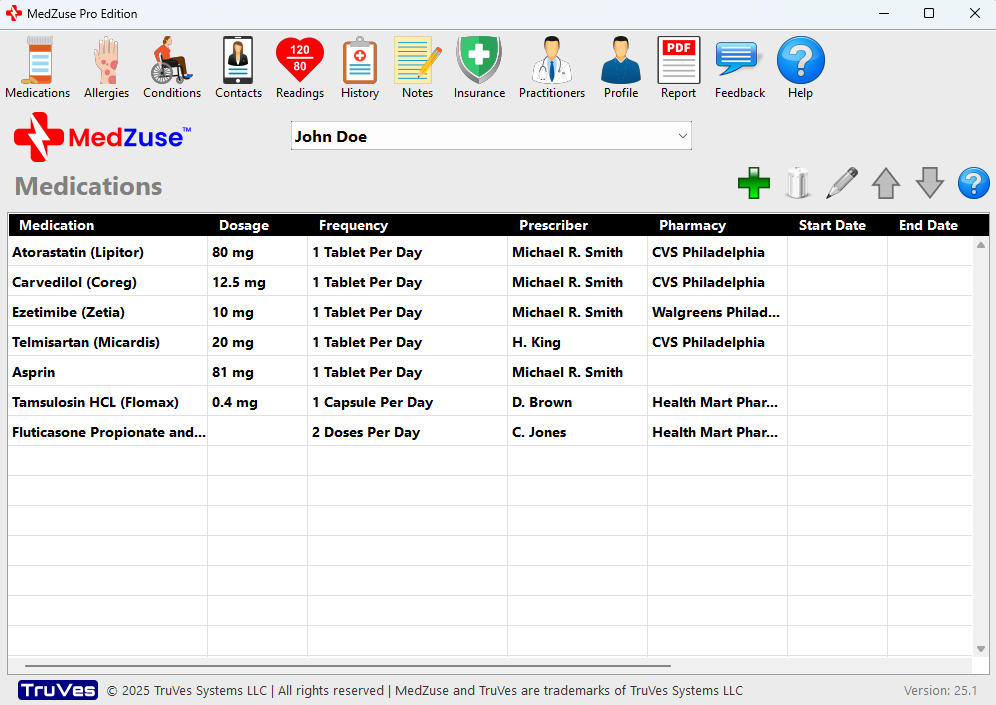
MedZuse features a clean, minimalist interface designed for intuitive navigation. The layout emphasizes clarity and ease of access, with well-organized menus and logical workflows for entering and retrieving health data. Users can quickly switch between profiles, add new entries, and generate reports without needing technical expertise.
Navigation is straightforward, with a sidebar menu providing access to key sections such as medications, allergies, conditions, and reports. The visual style is professional and uncluttered, minimizing distractions and focusing attention on health data. Although the developer did not list formal performance metrics, the app’s lightweight size of 25.3 MB suggests efficient resource usage, which likely contributes to smooth operation across a range of Windows devices.
Responsiveness appears consistent across different screen sizes, and the application remains stable during routine tasks such as data entry and report generation. The absence of ads further supports a seamless user experience. While specific testing on low-end hardware was not disclosed, the app’s design suggests it is optimized for performance on standard desktop and laptop systems.
Platform Compatibility & Technical Requirements
MedZuse is designed exclusively for the Windows platform. The current version, 1.0.0, has a file size of 25.3 MB, indicating a lightweight and efficient application. This small footprint makes it suitable for installation on systems with limited storage capacity.
The developer did not specify minimum OS requirements, compatibility with older Windows versions, or hardware specifications. As such, users should verify system compatibility before installation. While the app is likely optimized for modern Windows environments, exact support details were not provided. The absence of cloud sync or cross-platform functionality suggests that MedZuse is intended for single-device use, with data stored locally on the user’s machine.
Pros and Cons
Pros
- Secure, local data storage with optional password protection
- Unlimited user profiles for family health management
- Customizable PDF report generation for healthcare sharing
- Ads-free interface for uninterrupted use
- Lightweight design with minimal system resource usage
Cons
- Platform limited to Windows; no support for Android or iOS
- Developer did not disclose minimum OS or hardware requirements
- No cloud backup or synchronization across devices
- Price point of $14.99 may be considered high for a one-time purchase
- Limited availability for users outside the Windows ecosystem
FAQ
Is MedZuse safe to use for storing sensitive health information?
Yes. MedZuse stores all data locally on the user’s device and does not transmit information to external servers. An optional password protection feature adds an additional layer of security.
Can I use MedZuse on multiple computers?
Yes, the app can be installed on multiple Windows devices. However, since data is stored locally, users must manually transfer files between devices if needed.
Does MedZuse support cloud backup or sync?
The developer did not provide information about cloud backup or synchronization features. All data remains on the user’s device.
Is MedZuse available for Android or iOS?
No. MedZuse is currently designed only for the Windows platform. There is no official version available for Android or iOS devices.
How often should I update MedZuse?
Updates are released by the developer to improve performance and fix bugs. Users should check for updates regularly through the official source to ensure they have the latest version.
Final Thoughts
MedZuse stands out as a reliable, privacy-focused tool for managing personal and family health records on Windows. Its ability to centralize critical medical data, generate professional reports, and support multiple users makes it a valuable asset for individuals and households. While the lack of cross-platform availability and cloud sync may limit its reach, the app’s emphasis on local security and a clean user experience compensates for these limitations.
For users who prioritize data privacy, need a simple yet powerful health tracking system, and operate primarily on Windows, MedZuse offers a compelling solution. Its one-time purchase model provides long-term access without recurring fees. The app is particularly beneficial for families managing complex health needs or individuals preparing for medical appointments.
Download MedZuse now
Guides & Tutorials for MedZuse - Personal Medical Record System
How to install MedZuse - Personal Medical Record System
- Click the Preview / Download button above.
- Once redirected, accept the terms and click Install.
- Wait for the MedZuse - Personal Medical Record System download to finish on your device.
How to use MedZuse - Personal Medical Record System
This software is primarily used for its core features described above. Open the app after installation to explore its capabilities.
User Reviews for MedZuse - Personal Medical Record System 0
No reviews found


